For many years, VMware has led the way in enterprise virtualization thanks to its comprehensive portfolio—ESXi, vSphere, and NSX—which collectively handle everything from virtualization to software-defined networking (SDN). Lately, though, VMware’s evolving business decisions have left some organizations feeling uncertain about staying on that path.
If you’re looking for a dependable, open-source alternative, three strong contenders often come up: Proxmox, KubeVirt, and OpenShift Virtualization. All are built around KVM/QEMU/libvirt, but they vary in how they handle management, integration, and enterprise features. Below, we’ll look at what it takes to move off VMware and explore how these three solutions can meet a range of IT requirements.
Why Leaving VMware Can Be Challenging
</>Feature Gaps
VMware’s ecosystem covers nearly all parts of a virtualization stack. Its virtualization, networking (NSX), and storage management capabilities set a high bar. Matching every feature—especially in networking—can be tricky when switching platforms.
Infrastructure Overhaul
VMware tends to be deeply woven into automation and day-to-day workflows. Removing ESXi/vSphere is feasible, but replacing NSX may require significant changes, along with a willingness to adapt workflows and possibly bring in outside tools.
Process Adjustments
Admins who’ve worked exclusively with VMware might need additional training for platforms like KubeVirt or OpenShift Virtualization, which introduce Kubernetes concepts and enable more DevOps-oriented operations.
Complex Networking
Although Proxmox offers its own SDN options and Kubernetes-based solutions support various SDN plugins, fully replacing NSX is often a heavy lift. If your organization relies on NSX’s advanced networking and security, you’ll need extra planning (and sometimes outside tooling) to fill those gaps.
Despite these hurdles, all three platforms — Proxmox, KubeVirt, and OpenShift Virtualization— offer distinct advantages and remain popular options for organizations considering an open-source virtualization stack.
Proxmox
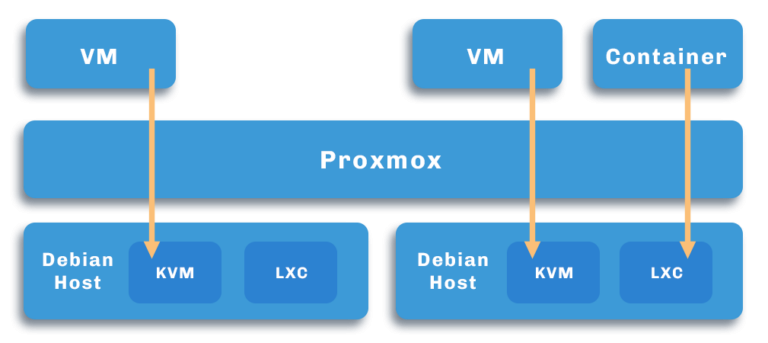
</>Proxmox is known for its ease of setup and use. It appeals to teams seeking a transition that doesn’t stray too far from the traditional way VMs are managed, e.g. with VMWare or RedHat Virtualization.
Underlying Tech
At its core, Proxmox, as well as the other technologies presented here, relies on the KVM/QEMU/libvirt stack for virtual machines and LXC for containers. This approach gives you a straightforward virtualization layer that feels familiar if you’re coming from VMware, with a similar way of managing VMs and Containers.
Administration and Clustering
The Proxmox web interface is designed to be user-friendly. Clustering multiple Proxmox nodes is also baked in, providing a unified view of resources across your setup and enabling high availability and VM migration.
Automation
Proxmox integrates nicely with tools like Ansible and Terraform for VM lifecycle management, which can be helpful for large or distributed deployments. However, its out-of-the-box SDN functionality isn’t on the same level as NSX. If you rely on advanced networking, you’ll likely need extra components or a different approach to match VMware’s networking capabilities.
If you’re looking for a drop-in hypervisor replacement without requiring full NSX-level networking, Proxmox can be an excellent choice.
KubeVirt
</>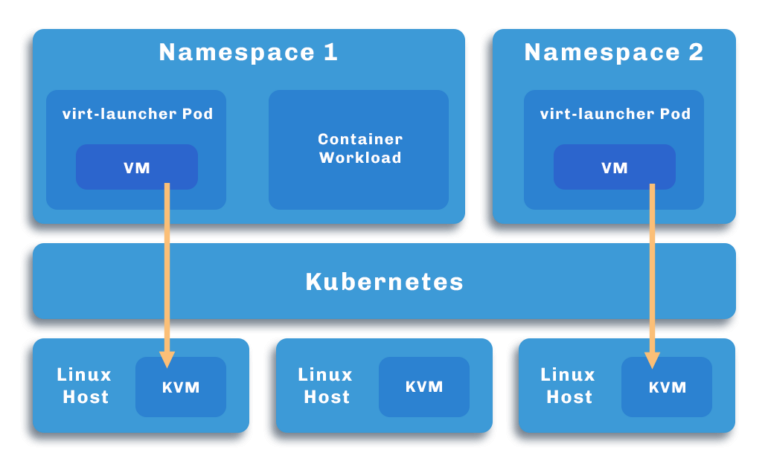
By contrast, KubeVirt is designed to run virtual machines within a Kubernetes cluster. It’s also built on KVM/QEMU/libvirt, but packages VMs as if they were another resource within Kubernetes, allowing to treat them like a container for a good part of the configuration.
Declarative Management
In KubeVirt, virtual machines, snapshots, and networks all are Kubernetes Custom Resources. You manage them with YAML definitions and Kubernetes APIs, which aligns well with container-centric operations and can greatly simplify a future transition from VMs to containers.
Networking via Kubernetes
Because KubeVirt runs on Kubernetes, you can take advantage of Kubernetes SDN plugins (like OVN-Kubernetes, Calico or OVN) and resource constructs (Services, NetworkPolicies, Project Quotas). This unifies your container and VM networking in a single cluster.
CI/CD and GitOps
One of KubeVirt’s big advantages is how naturally it fits into DevOps workflows. VM definitions can live alongside application deployments in repositories, letting GitOps pipelines handle VM deployments and updates just as they do for containers.
Organizational Shift
Moving to KubeVirt often means your team will need to develop Kubernetes expertise if your company did not yet adopt Kubernetes. While that can be a hurdle, it also sets you up for a future where containers and VMs coexist in one platform, potentially streamlining operations over time and allowing for a gradual transition of existing VMs to a container-based approach.
OpenShift Virtualization
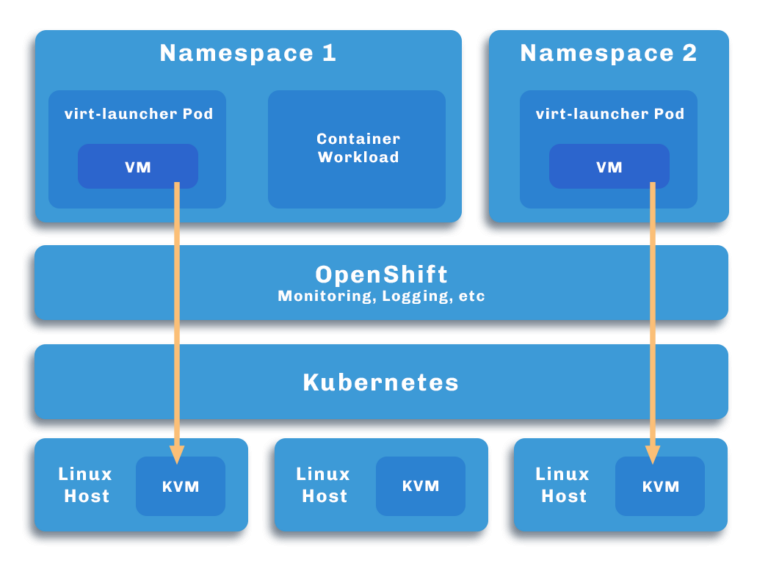
</>OpenShift Virtualization, previously called CNV (Container-Native Virtualization), is Red Hat’s enterprise offering based on KubeVirt. It brings all the advantages of KubeVirt, plus deeper integrations into the OpenShift ecosystem.
KubeVirt at Its Core
Because OpenShift Virtualization builds on top of KubeVirt, it uses the same KVM/QEMU/libvirt stack. You get the same method of managing VMs as Kubernetes resources, but with additional refinement.
OpenShift Ecosystem
Operators: Red Hat Operators help automate routine tasks, from backups to scaling, reducing daily overhead. You can leverage the OpenShift Data Foundation for Storage provision, the OpenShift APIs for Data Protection (OADP) for Backups with Velero, etc.
Monitoring and Logging: OpenShift’s Prometheus- and Grafana-based observability stack naturally extends to virtual machines as well.
Security and RBAC: You can apply the same Role-Based Access Control (RBAC) policies that protect containerized apps to your VMs too.
Built-in Templates: A range of prebuilt templates and images simplifies VM creation and ensures consistency across deployments, offering a great starting point for creating golden images tailored exactly to your companies needs.
Enterprise Support: Choosing OpenShift Virtualization gives you Red Hat’s backing plus an active ecosystem of partners and third-party integrations. If you already use OpenShift for containers, this creates a seamless environment for running both containers and VMs.
Which Solution Fits You Best?
</>The question which solution fits best for your and your companies needs is highly dependent on your infrastructure, your processes and of course the long term vision you have for your infrastructure, so we only break it down to a single statement for each solution to give you a rough overview of what to expect.
Proxmox: Ideal if you want an easygoing, classic hypervisor experience that minimizes disruption and costs. It loosely parallels VMware’s virtualization style but may require external solutions for advanced SDN.
KubeVirt: Suited for teams aiming to blend VM and container management within one Kubernetes cluster. It’s a great fit for organizations already committed to—or willing to embrace—Kubernetes-based workflows.
OpenShift Virtualization: Tailored for enterprises that prefer Red Hat’s supported ecosystem. It leverages KubeVirt while providing a range of integrations and an established support channel.
Conclusion
</>As VMware evolves its business model, it’s only natural to look into alternative virtualization platforms that can offer comparable stability and scalability, minus the uncertainty of proprietary lock-in. Proxmox, KubeVirt, and OpenShift Virtualization represent three strong open-source choices that can meet a variety of enterprise needs, whether you favor a straightforward drop-in replacement or the advantages of a Kubernetes-driven approach.
Ultimately, your decision should reflect your current infrastructure, the skills of your team, and your long-term IT strategy. Proxmox offers a familiar route with minimal cultural changes, while KubeVirt and OpenShift Virtualization let you embrace modern DevOps workflows and unify container and VM management. This decision needs to be made not based on articles you read on the internet but by analyzing your needs, your goals for the coming years and of course your budget. We would be happy to help you to start your journey towards a more flexible and robust infrastructure.
Fragen?
Wir helfen gern, unverbindlich, kompetent und fast automatisch.