
In this article, our systems engineer Sandro Bollschweiler provides insights into how to speed up templating in Ansible.
The idea was derived from repeatedly observed situations at various customers that all executed long-running loops, presumably historically grown, instead of simplifying routines with sleek solutions.
Check for yourself how you could save time and open up new possibilities. A must-read for anyone who faces similar challenges regularly!
The simplified customer use case
For a minimal breakdown we used a template, some variables to loop over and a playbook to execute.
Premise and Concept
</>From time to time we notice that customers generate hundreds of files by using a loop over the template module. Of course, it works, but every single run of the template module (depending on your network) runs for ~0.5s. Doing it 100 times takes about 50 seconds for the ‘mass templating’ to complete. Way too long, we think.
Here is what we did for one of our customers with the same problem.
Template config.ini.j2:
[config]
Parameter={{ item.value }}
Group vars file:
values:
  - value: 1
  - value: 2
[...]
  - value: 48
  - value: 49
  - value: 50
Playbook:
---
- hosts: localhost
  become: false
  gather_facts: no
  tasks:
    - template:
        src: templates/config.ini.j2
        dest: "/tmp/config{{ item.value }}.ini"
      loop: "{{ values }}"
This test case executes in ~15 seconds.
Avoiding the template module
</>After scouring the Internet and finding no ready-made solutions, we took a closer look at the template module. Broken down, it performs the following two steps:
- Render the template locally on the control node
- Distribute the rendered file with the copy module
We asked ourselves, could these two steps be optimized for a large number of files generated by looping? There is already a built-in, fast way to mass transfer files using the sync module. What is missing is a way to render all templates locally at once.
Proof of concept with a Python script
</>We came up with a Python script, that uses the yaml & jinja2 modules to replicate the rendering part of the template module without the Ansible overhead:
"""Read group_vars/all/configs.yml and use values to render the config.ini.j2 template"""
import yaml # The group_vars file is yaml so we need yaml support
from jinja2 import Environment, FileSystemLoader # Environment will contain the templates and does the rendering, FileSystemLoader will load the template from disk

# Read group_vars
with open('group_vars/all/configs.yml') as config_file:
     configs = yaml.safe_load(config_file)

# Setup Jinja environment and define template path for FileSystemLoader
env = Environment(
    loader = FileSystemLoader('templates')
)

# Loop through all dicts 'values'
for current_config in configs['values']:
    # Load template
    config_template = env.get_template('config.ini.j2')

    # Open a filehandle with the target file name
    with open(f"/tmp/generate/config{current_config['value']}.ini",'w') as config_output:
        # Put config in a dict with key "item" to call upon it with the standard Ansible loop var
        ansible_loopvar = { "item": current_config }

        # render template, supplying the current component variables
        rendered_template = config_template.render(ansible_loopvar)

        # Put it to disk
        config_output.write(rendered_template)
Rendering the templates with the script, all 50 files are created in 0.089 seconds. A playbook using the script could look like this:
---
- hosts: localhost
  become: false
  gather_facts: no
  tasks:
    - name: Render templates locally with python
      script: render_configs.py
      args:
        executable: python
    - name: Deploy files to target'
      synchronize:
        dest: /tmp
        src: /tmp/generate
        archive: no
        checksum: yes
Running it, this playbook finishes within ~1s, which is really impressive.
First conclusions
</>By running the template rendering outside of Ansible and transferring the files at once with the sync module, we were able to drastically reduce the overall execution time – mission achieved. However, this solution also has some drawbacks.
The synchronize module is somewhat inconvenient for setting file permissions. Most likely, another task would be required to set the correct permissions on the target node.
By handling the file creation ourselves, we also have to take care of the cleanup. This is especially important if the generated files could contain sensitive data.
In addition, the exemplary use case relies on all the variables to be in a single variable file.
Last but not least, if it is necessary to use values encrypted with Ansible Vault, decryption of these values must also be implemented in the script.
Not being able to access all variables could become a game breaker in more complex (i.e. realistic) scenarios. However, now that we have proven a significant speed increase by rendering all the templates at once, we can look at options to reintegrate our changes back into Ansible.
Using Action Plugins for local processing in Ansible
Ansible gives us the ability to extend it with our own modules and plugins. Local processing of templates suggests writing an Action Plugin.
Translating a script to an Action Plugin
An Action Plugin can be called just like a regular built-in module. In fact, the built-in template module is an Action Plugin and not really a module. You can find some sample code in the Ansible Docs to get started.
Key points are:
- A new class needs to be implemented with an ActionBase as a parent
- The class needs a method called ‘run’
- Parameters supplied to our Action Plugin are stored in the _task. args property
- The current Ansible facts are passed as an argument on instantiating the Action Plugin (task_vars)
- The init method of ActionBase also instantiates a Jinja Environment: _templar
Our script loads the contents of a group_vars file. This is no longer necessary, as the group vars are read by Ansible automatically and passed to the module. Also, the Jinja environment is already set up.
The only thing we need to do is take our use case, think about how we can make it more generic/reusable and call the right methods.
According to Ansibles’ own documentation, we define our parameters as an overview
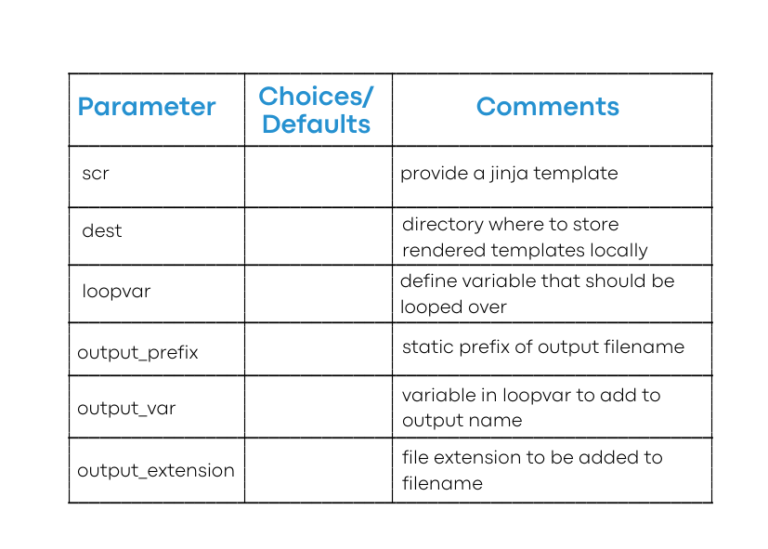
With all of this in mind we rewrite our original script into an Action Plugin:
#!/usr/bin/python
# Make coding more python3-ish, this is required for contributions to Ansible
__metaclass__ = type

from ansible.module_utils._text import to_text
from ansible.plugins.action import ActionBase

class ActionModule(ActionBase):
    def run(self, tmp=None, task_vars=None):
        super(ActionModule, self).run(tmp, task_vars)

        # Process arguments
        src = self._task.args['src']
        dest = self._task.args['dest'] if self._task.args['dest'].endswith('/') else self._task.args['dest'] + '/'
        loopvar = task_vars[self._task.args['loopvar']]
        output_prefix = self._task.args['output_prefix']
        output_var = self._task.args['output_var']
        output_extension = self._task.args['output_extension']

        # Initialize output list
        rendered_templates = []

        # Copy current 'facts' to modify them later
        temp_vars = task_vars.copy()

        # Read template
        with open(src, 'rb') as f:
            template_data = to_text(f.read(), errors='surrogate_or_strict')

        # Loop through loopvar and render templates
        for current_item in loopvar:
          # Set item 'fact' in temp_vars to use in template
          temp_vars['item'] = current_item

          # Build output filename
          out_file_name = dest + output_prefix + str(temp_vars['item'][output_var]) + '.' + output_extension

          # Render template with the modified 'facts'
          with self._templar.set_temporary_context(available_variables=temp_vars):
              rendered_template = self._templar.do_template(template_data, preserve_trailing_newlines=True, escape_backslashes=False)

          # Write the output
          with open(out_file_name, 'w+') as output_file:
              output_file.write(rendered_template)
              rendered_templates.append(out_file_name)

        # Mark the task as 'changed' and return a list of rendered templates
        return dict(changed=True, ansible_facts=dict(rendered_templates=rendered_templates))
Hint: The use of _templar was taken directly from the original template module. The source code for this can be found in every Ansible installation under lib/ansible/plugins/action/template.py.
To use the Action Plugin, we place it in a folder called action_plugins in our playbook dir and name it something relevant (e.g. render_templates.py). After that, we can use it under that name as any other module in a playbook.
You may have noticed that we also update the ansible_facts in the return value of the run methods. Therefore we can work with the list of templates in other tasks as well (here in a simple debug task):
---
- hosts: localhost
  become: false
  gather_facts: no
  tasks:
    - render_templates:
        src: templates/config.ini.j2
        dest: /tmp/generate
        loopvar: values
        output_prefix: config
        output_var: value
        output_extension: ini
    - debug:
        msg: "{{ rendered_templates }}"
Using the same template and group_vars files as before, the execution time is roughly the same as we observed with the ‘external script’ solution at <1s.
Final conclusion
</>By rewriting our existing script into an Action Plugin, we extended Ansible’s base functionality to meet our specific needs, made our lives easier by reusing existing code, and created a well-maintainable and easy-to-use solution for our other team members.
The possibilities are endless. To continue, we could extend the plugin parameters and also integrate the synchronize module/action plugin to round the plugin off and provide both templating and distribution of files.
Finally, it should be noted that the above example should be supplemented with error handling for real-world use.
Bonus Tip: Collections
</>Right now, our Action Plugin is still a single file that we have to manually distribute to our playbook directories. This could be solved by using collections.
Action plugins (as well as other Ansible Content) can be distributed with a collection (stored in the plugins/action directory). Once published, be it on Ansible Galaxy or your private Git repository, a collection can be easily installed via the command:
ansible-galaxy collection install <...>
Follow us on LinkedIn not to miss more tips to come! Feel free to comment and share your experiences there!
For a more complete overview about our automation expertise explore our automation service offering.
Fragen?
Wir helfen gern, unverbindlich, kompetent und fast automatisch.